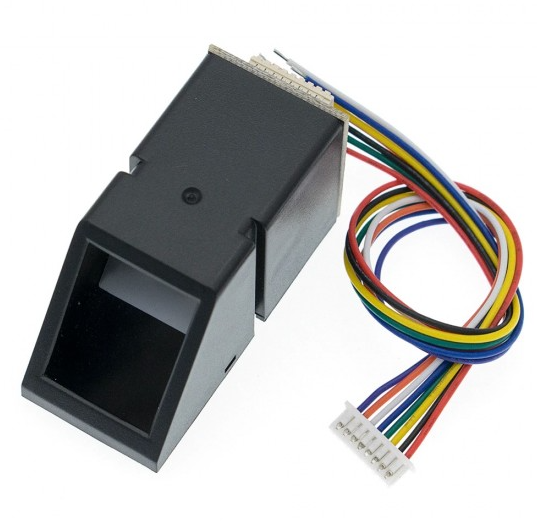
AS608 Optical Fingerprint Sensor – KSH 2,000 at HIMA TRONICS Mombasa – Top quality sensors. Best electronics in Kenya. Shop now for Arduino, ESP32, sensors and IoT devices.

AS608 Optical Fingerprint Sensor

SKU: HMJ062 Category: Sensors
KSH 2,000.00
In Stock
Inquire
Product Description

AS608 Optical Fingerprint Sensor Module

= High-Performance Biometric Fingerprint Module for Arduino and Security Projects =

The AS608 optical fingerprint sensor module is a compact AllinOne biometric authentication device featuring the integrated Synochip AS608 processor . With built-in DSP and fingerprint recognition algorithms, it captures, stores, and matches fingerprints via simple UART communication, bypassing complex image processing tasks .

AllinOne Recognition Chip - Integrates image capture, DSP, and algorithm processing in a single module
300 Fingerprint Capacity - Stores up to 300 fingerprint templates for comprehensive access control
Critical: Power supply is 3.3V DC only . Applying 5V can permanently damage the module
Module supports both USB and UART communication - for typical Arduino projects, connect via UART pins

= Technical Specifications =

ParameterValue
Resolution500 DPI
Fingerprint Capacity300 templates (ID 0-299)
Image Entry Time<1.0 seconds
Search Time<0.3 seconds
Operating Current30-60mA
False Recognition Rate<0.001%
CommunicationUART / USB
Dimensions46 x 21 x 24mm

= Key Features =

Builtin DSP Processor Handles image capture, feature extraction, and matching internally, no complex programming required

Dual Fingerprint Storage Buffers - CharBuffer1 and CharBuffer2 for temporary feature and template storage

Enrollment and Matching Support - Both 1:1 (comparison) and 1:N (search) authentication modes

72KB Image Buffer Highresolution 288x256 pixel grayscale image capture

NonVolatile Storage Fingerprint templates persist after poweroff, includes 512byte user notepad (16 pages x 32 bytes)

== Applications ==

  1. Access control and door lock systems
  2. Biometric attendance and time tracking systems
  3. Smart safes and secure storage enclosures
  4. IoT and embedded security projects
  5. Password management and authentication devices
Comprehensive Security Solution Fullfeatured fingerprint recognition ideal for reliable biometric authentication
Easy Integration Industrystandard UART communication with extensive Arduino and Python libraries

√ Works with Arduino, ESP32, and Raspberry Pi via serial connection

√ Supports enroll, verify, search, and delete commands

√ Includes 6-pin connector and cable with many kits

= Connection Guide =

AS608 PinArduino UNOFunction
VCC3.3VPower supply (3.3V only)
GNDGNDGround
TXPin 2 (RX)Transmit data to Arduino RX
RXPin 3 (TX)Receive data from Arduino TX
Touch Out (Blue)OptionalTouch detection signal
Touch Power (Green)OptionalTouch circuit power (3.3V)
Use hardware or software serial for communication
For 5V Arduino systems, some sources suggest UART pins are 5V tolerant, but power must always be 3.3V . However, Adafruit recommends 3.3V operation
Applying 5V to the VCC pin will damage the module
Ensure TX to RX and RX to TX cross-connection for proper UART communication

= Operation Modes =

Fingerprint Enrollment Process :

  1. Capture finger image twice
  2. Extract features from both captures
  3. Generate combined template from both feature sets
  4. Store template in module's flash memory

Fingerprint Matching Process :

  • 1:1 Comparison: Matches a specific stored fingerprint ID
  • 1:N Search: Searches all stored templates for a match

Reliable Authentication - Fast and accurate biometric identification

Versatile Modes - Both comparison and search modes supported

√ Various Arduino libraries available (Adafruit Fingerprint Sensor Library)

√ Python support via AS608 library

√ Rust support via a608_embedded library

= Troubleshooting =

Module not responding:

  • Verify 3.3V power supply and GND connections
  • Check UART connections (TX to RX, RX to TX)
  • Try swapping TX and RX wires
  • Install appropriate USB driver for serial adapter

No fingerprint detection:
  • Clean optical sensor surface
  • Adjust finger placement on the sensor
  • Check if module was accidentally powered with 5V (may cause damage)