PR121 Breakout V12 Capaacitive Touch Sensor Controller Module I2C Interface keyboard Development Board for arduino – KSH 600 at HIMA TRONICS Mombasa – Top quality sensors. Best electronics in Kenya. Shop now for Arduino, ESP32, sensors and IoT devices.

PR121 Breakout V12 Capaacitive Touch Sensor Controller Module I2C Interface keyboard Development Board for arduino

SKU: HMJ576 Category: Sensors
KSH 600.00
In Stock
Inquire
Product Description

PR121 Breakout V12 Capacitive Touch Sensor Controller Module

= I2C Interface Keyboard Development Board for Arduino =

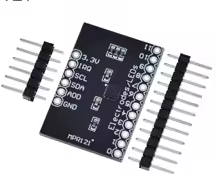
The MPR121 Breakout V12 is a capacitive touch sensor controller driven by an I2C interface, designed to create custom touch interfaces and keyboards for Arduino and other microcontrollers. It simplifies the process of adding touch sensitivity to your projects .

12 Touch Inputs - Supports up to twelve independent electrodes plus a simulated thirteenth
I2C Communication Simple 2wire interface with interrupt output for efficient touch detection
Operating voltage is 2.5V to 3.6V DC - do not exceed the rated voltage
Default I2C address is 0x5A with onboard pull-up resistors
This is a 3.3V logic device - use level shifting for 5V Arduino boards

= Technical Specifications =

ParameterValue
Touch Inputs12 electrodes (plus simulated 13th)
CommunicationI2C (with interrupt output)
Operating Voltage2.5V to 3.6V DC
Supply Current29μA at 16ms sampling interval
Stop Mode Current3μA
Operating Temperature-40°C to +85°C
Dimensions30 x 20mm

= Key Features =

12 Capacitive Touch Inputs - Easily create custom touch keypads

8 LED Driver Pins - When not used as touch electrodes, pins can drive LEDs

Configurable Sensitivity Autoconfiguration of each sensor input

I2C Interface with Interrupt - Efficient communication with any microcontroller

Selectable I2C Address - Default 0x5A, adjustable via ADD pin jumper

== Applications ==

  1. Custom keyboard and keypad interfaces
  2. Proximity detection and touch sensing
  3. Capacitive touch organ and musical instruments
  4. Human-machine interfaces (HMI)
  5. Hidden touch buttons behind panels
Easy to Use - Works with Adafruit_MPR121 library for quick setup
Versatile Interface Use with Arduino, Raspberry Pi, or any I2Ccapable MCU

√ Includes header pins for easy wiring

√ Onboard 10kΩ pull-up resistors for I2C lines

√ Low power consumption ideal for battery-powered projects

= Connection Guide =

Module to Arduino (3.3V) :

  • VCC → 3.3V (not 5V)
  • GND → GND
  • SDA → A4 (Uno/Nano) or SDA pin
  • SCL → A5 (Uno/Nano) or SCL pin
  • IRQ → Digital interrupt pin (optional)
Use level shifters when connecting to 5V Arduino boards
Cut the ADD jumper trace if you need to change the I2C address
This board does not have an onboard voltage regulator

= Troubleshooting =

Module not detected:

  • Verify 3.3V power supply (not 5V)
  • Check I2C connections (SDA, SCL)
  • Confirm default address 0x5A

Inconsistent touch detection:

  • Adjust touch/release thresholds via software
  • Ensure clean, dry contact surface
  • Avoid large metal objects near the sensor