ISD1820 Voice Recording and Playback Module
= Complete Voice Board with Microphone and Loudspeaker =
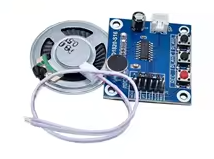
The ISD1820 is a voice recording and playback module that offers a simple way to add 10 seconds of audio to your projects. It comes with a built-in microphone and an 8Ω 0.5W speaker, allowing for standalone operation without a microcontroller.
Simple Recording Solution Record and play back messages with builtin microphone and speaker
Easy Integration - Can be used standalone with buttons or with an Arduino for automated playback
Operating voltage is DC 3V to 5V for the board
For automated playback, connect the PLAY pin to a microcontroller pin
The recorded message is retained even without power, thanks to the onchip nonvolatile memory
= Technical Specifications =
| Parameter | Value |
|---|
| Recording Time | 10 seconds (default, can be adjusted) |
| Operating Voltage | DC 3V to 5V |
| Working Current | 60mA |
| Speaker Output | 8Ω 0.5W (included) |
| Repeat Recording | 100,000 times |
| Dimensions | 54 x 38 x 16mm |
= Module Features =
Multiple Playback Modes Supports loop, jog, and singlepass playback via DIP switches
Onboard Microphone Builtin electret mic for direct recording
Simple Button Control REC, PLAYE, and PLAY-L buttons for manual operation
NonVolatile Storage Retains recordings even when power is removed
== Applications ==
- Voice prompts and alerts in embedded systems
- Interactive toys and games
- Security systems with audio notifications
- Message repeaters and announcements
- Educational audio projects
Versatile Project Component - Works as a standalone megaphone module or as part of a larger system
Easy to Use - Record with one button, play with another
√ Includes microphone and 8Ω 0.5W speaker
√ Can be controlled by buttons or microcontroller
√ Compact size for easy integration
= Connection and Operation Guide =
Pinout:
- REC: Active HIGH record signal (hold HIGH to record)
- PLAYE: Edgeactivated playback (starts on HIGH transition)
- PLAYL: Levelactivated playback (play while HIGH)
- FT: FeedThrough mode (microphone directly drives speaker)
- SP+ / SP-: Speaker output terminals (8Ω impedance)
Basic Operation:
- Press and hold the REC button to record (10 seconds max)
- Press PLAYL for levelactivated playback
- Press PLAYE for edgeactivated playback
- Use DIP switches to set loop or single-pass playback modes
For loop playback, link the P-E pins on the board
For microcontroller control, connect the REC and PLAY pins to digital outputs
Do not exceed 5V power supply
The module is not designed for high-fidelity audio—some background noise is normal
= Troubleshooting =
No sound playback:
- Verify power supply is 3V-5V and correctly connected
- Check speaker connection to SP+ and SP- terminals
- Ensure a message has been recorded
Poor recording quality:
- Speak directly into the onboard microphone
- Minimize background noise during recording
- Consider that 10-second time frame yields moderate fidelity due to sampling rate