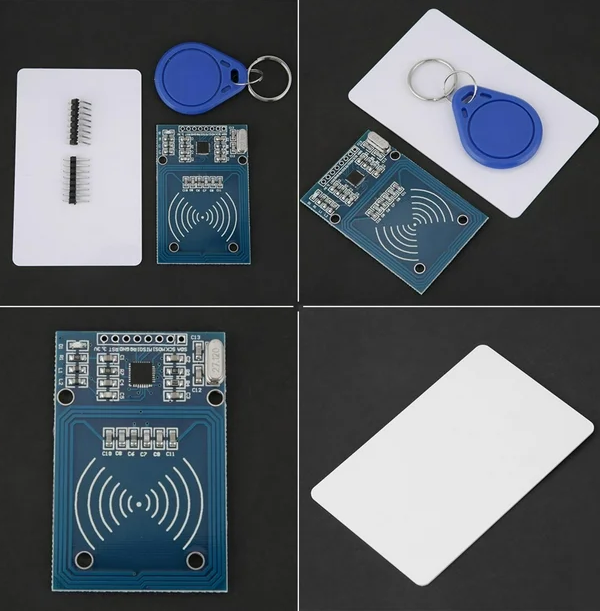
RC522 RFID Card Reader Module Kit
= 13.56MHz Proximity Sensor for Arduino and Access Control Systems =
The RFIDRC522 module is a highly integrated, compact readerwriter designed for contactless communication at 13.56MHz . This kit is ideal for access control, payment systems, and identification projects with microcontrollers like Arduino .
Supports MIFARE Standards - Reads S50, S70, Ultralight, and other ISO 14443A compatible cards
Easy SPI Interface Simple 4pin connection to Arduino and other MCUs
Operating voltage: 3.3V DC; Logic pins are 3.3V tolerant, but the module is compatible with 5V logic with level shifting .
Reading distance: Typically up to 5-10cm .
In Arduino IDE, install the MFRC522 library via the Library Manager for quick setup .
= Technical Specifications =
| Parameter | Value |
|---|
| Operating Frequency | 13.56MHz |
| Communication Interface | SPI |
| Operating Current | 13-26mA |
| Reader Distance | <10cm |
| Package Includes | RC522 Module, S50 Card, S50 Key Fob, Pin Headers |
= Key Features =
Powerful Encryption - Supports rapid CRYPTO1 algorithm for secure data transmission .
Compact Module - Small footprint (40mm x 60mm) for easy integration into projects .
Comprehensive Kit - Includes both a plastic card and a keychain fob for versatility .
== Applications ==
- Electronic door locks and access control systems .
- Time and attendance entry terminals .
- Smart payment systems and vending machines .
- Inventory management and asset tracking .
Perfect for Beginners Opensource libraries and example code make setup easy .
Plug and Play - The kit includes all necessary components to start your project .
√ Compatible with Arduino Uno, Mega, Nano, and Raspberry Pi .
| √ Includes two RFID tags | one card and one key fob . |
= Pin Connection Guide =
| RC522 Pin | Arduino Pin |
|---|
| 3.3V | 3.3V |
| GND | GND |
| RST | Digital Pin 9 |
| SDA (SS) | Digital Pin 10 |
| MOSI | Digital Pin 11 |
| MISO | Digital Pin 12 |
| SCK | Digital Pin 13 |
Note: While the module uses 3.3V logic, the 3.3V pin from the Arduino can power the module directly .
= Troubleshooting =
Module not detected:
- Ensure correct wiring as per the connection table.
- Verify the SPI pins are correctly assigned in your code.
- Check that the module's 3.3V pin receives stable power.