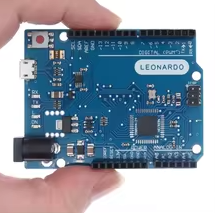
Leonardo R3 Microcontroller Development Board ATMEGA32U4 official version with USB Cable For Arduino
KSH 1,600.00
Out of Stock
The Leonardo R3 is an official version microcontroller board based on the ATmega32u4 chip. Unlike other Arduino boards, it features integrated USB communication, eliminating the need for a separate USB-Serial chip and allowing it to emulate keyboard/mouse functions.
| Parameter | Value |
|---|---|
| Microcontroller | ATmega32u4 |
| Operating Voltage | 5V |
| Input Voltage (recommended) | 7-12V |
| Input Voltage (limit) | 6-20V |
| Digital I/O Pins | 20 |
| PWM Channels | 7 |
| Analog Input Pins | 12 |
| Clock Speed | 16 MHz |
| Flash Memory | 32 KB (4 KB used by bootloader) |
| SRAM | 2.5 KB |
| EEPROM | 1 KB |
Native USB Support - ATmega32u4 handles USB directly, enabling HID functionality
Keyboard/Mouse Emulation - Appears as HID device to computer
High Analog Count 12 analog inputs for sensorrich projects
40mA I/O Current Higher perpin current than standard Arduino boards
ICSP Header - Supports SPI communication and firmware programming
√ USB Cable included in package
√ Works with existing Arduino shields
√ Official board with quality certification
Connect the Leonardo R3 to your computer using the included USB cable. Open Arduino IDE, select Tools > Board > Arduino Leonardo, then select the correct COM port. Upload your sketch directly - no additional programmer needed.
The ATmega32u4's native USB means the board appears as a keyboard, mouse, or joystick to the computer, enabling creative HID applications.
Plug and Play - USB cable included for instant connection
IDE Compatible - Standard Arduino programming environment
√ LED pin 13 for basic testing
√ Reset button and power jack included
√ Compatible with Arduino shields
Board not recognized: